


MyChoice Benefits
4.71.11K Reviews
App Specs
- Version
- 3.5.6
- Updated On
- License
- Free
- Downloads
- 500,000+
- Developer
- Businessolver
- Categories
- Business
- Platform
- Android, iOS
Screenshots
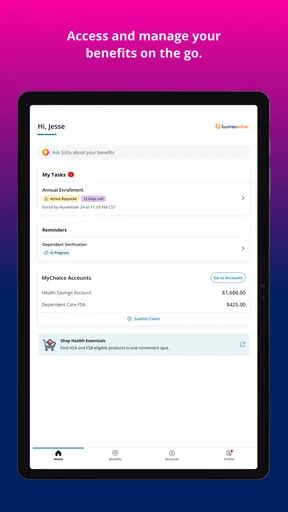
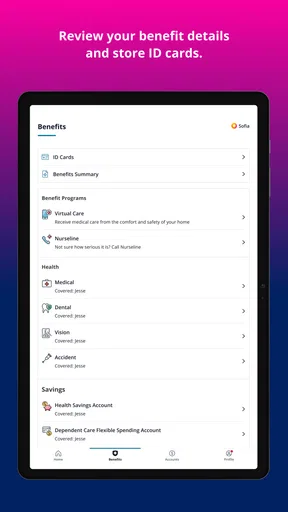
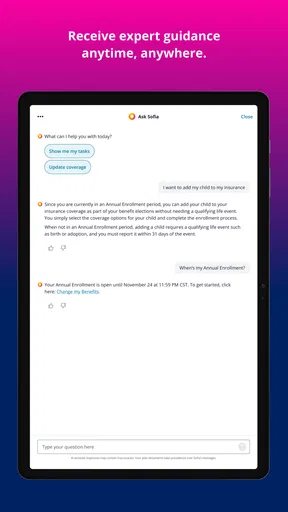
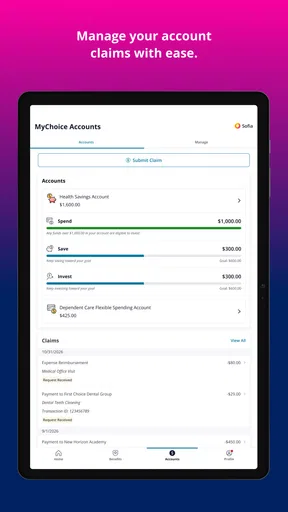
 Analysis by AppCompare
Have you ever found yourself lost in the maze of choosing the right benefits at work? Well, you're not alone! Navigating through a sea of options can be pretty daunting, but that's where MyChoice Benefits comes in to save the day. I've taken a deep dive into this app, and let me tell you, it's like having a friendly guide right in your pocket.
Why it helps in the first week
Benefits are easy to ignore until a decision is due, and then every unfamiliar term can feel urgent. MyChoice Benefits is a business app from Businessolver for eligible users, built around access to benefits and enrollment information. Its strongest first impression is practical: it gives you a place to begin sorting through choices rather than leaving you to piece everything together from scattered work messages and documents.
I’d find it most useful when starting a new job, approaching an enrollment window, or trying to understand a plan already offered through work. It is not a general insurance marketplace, so its usefulness depends on being eligible to use it through your employer. If you are looking for independent plan shopping or advice about benefits unrelated to your workplace, a public comparison resource or a qualified adviser may suit you better.
A realistic way to use it is to open the app before sitting down to make a decision. I’d first identify the plans I need to compare, then note the questions that affect my household—such as how often we expect to use care or whether a particular type of expense matters. That preparation helps keep a convenient summary from becoming a substitute for checking the details that actually shape a choice.
Your Personal Benefits Assistant
First things first, what really caught my attention about MyChoice Benefits is its user-friendly interface. From the moment you fire up the app, everything feels intuitive. The layout is clean, and the navigation is as smooth as butter. You don't need to be a tech wizard to figure this one out. It's designed for everyone, from the tech-savvy to the tech-challenged.
Exploring the Features
Now, onto the juicy details! The app offers a plethora of features that make selecting and managing your benefits a breeze. Whether you're looking at health insurance, retirement plans, or flexible spending accounts, the app has got you covered.
One of the standout features is the personalized recommendations. Based on your profile and preferences, the app suggests the best options tailored just for you. It's like having a benefits expert whispering in your ear, "Hey, this one's a good fit for you!"
Worth Reading Before You Choose

EA SPORTS FC Mobile 26 Is a Bigger Football Game, but It Takes Time

Flipboard Shows What News Apps Must Do Beyond the Feed

Switching to Android Auto Means Rethinking Your Driving Routine

Google Calendar Makes a Crowded Week Easier to Manage

Ludo King Makes the Most of the Minutes Between Plans

Baby Panda World Brings Quick Play to Modern Phones, but Its Game Library Feels Busy
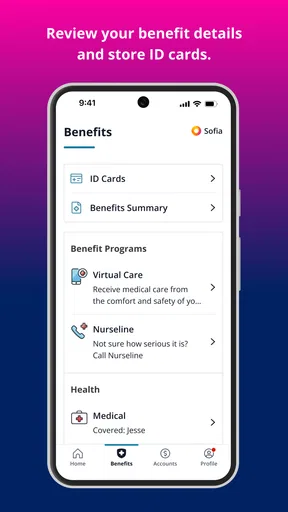
The app also provides a comprehensive overview of each benefit plan. You can dive into the nitty-gritty details, compare different plans, and even calculate potential savings. The comparison tool is particularly handy, allowing you to weigh your options side by side.
Making comparisons more useful
Side-by-side comparisons are helpful, but I would treat them as a way to narrow a shortlist, not as an automatic answer. A plan that appears cheaper at a glance may not fit someone who expects regular care, while a higher contribution can be worthwhile for a different household. The useful step is to connect what the app shows with your own likely needs, rather than choosing the option that looks simplest on screen.
One practical habit is to write down the assumptions behind any estimate before relying on it. If your expected use changes, revisit the comparison instead of carrying an old conclusion into a new enrollment period. This is especially important when benefits choices affect more than one person: a spouse’s coverage, dependents, or anticipated expenses can change which trade-offs matter most.
Simplifying Complex Choices
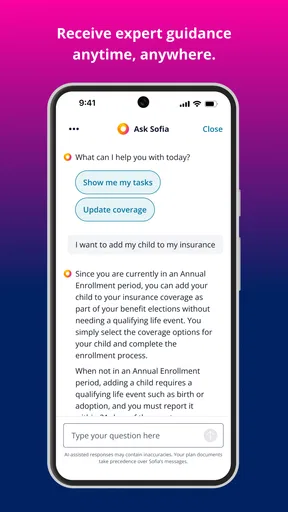
What I absolutely love about MyChoice Benefits is how it simplifies complex decisions. Benefits jargon can be confusing, but the app breaks it down into plain English. No more scratching your head over terms like "deductibles" or "copayments"—the app explains it all in an easy-to-understand manner.
The app also includes educational resources. If you're curious about something, just tap into the resource library, and voila! You'll find articles, videos, and FAQs that address common queries. It's a one-stop-shop for all your benefits-related questions.
From enrollment day to the next decision
The educational material is most valuable when it answers a specific question you have already identified. I would look up an unfamiliar term while comparing plans, then return to the plan details and check how that definition applies there. Reading general explanations first can build confidence, but the final decision should still be grounded in the terms of the benefit offered to you.
For someone who only reviews benefits once a year, the app may have a burst of value during enrollment and a quieter role afterward. That is not necessarily a flaw: workplace benefits are often episodic. I would keep it installed if I expect to check coverage details or revisit decisions, but someone who prefers paper records and rarely needs mobile access may not gain much from keeping another app on their phone.
Keeping Everything in One Place
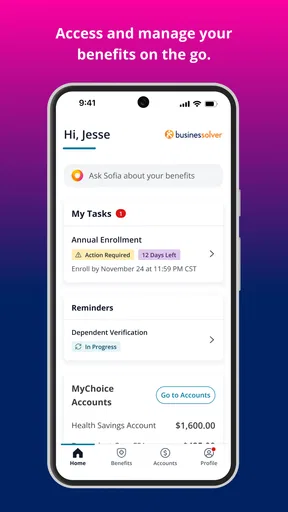
Another thing that makes MyChoice Benefits a winner is its organizational prowess. The app lets you store all your benefits information in one place. You can access your plan details, track your progress, and even receive reminders for important deadlines.
And here's a nifty feature: the app syncs with your calendar. So, if there's an upcoming open enrollment period, you'll get a gentle nudge to review and update your benefits. It's the little things like this that make life so much easier.
How it fits into a monthly routine
Compared with relying on email reminders, saved PDFs, or a company portal viewed only on a computer, a phone-based benefits app can make a quick check easier when a question comes up away from your desk. Its advantage is convenience and organization, not replacing every source of information. I’d still keep important employer documents accessible, especially when a decision depends on exact coverage language or a process that needs to be completed through a designated workplace channel.
To make the reminders useful rather than noisy, I’d treat them as prompts to act, not as proof that an enrollment task is finished. When one appears, open the relevant information, check whether anything has changed, and make a note of any action still required. That small routine reduces the risk of seeing a notification, assuming the matter is handled, and forgetting to complete the decision itself.
Maintenance and everyday friction
The app’s ongoing value depends on keeping the information you use current and being able to access the service through your workplace. If you change jobs or are no longer eligible, it may no longer serve as your personal benefits hub. For eligible users, the maintenance burden should be modest: return when a deadline or life change makes benefits relevant, and avoid treating old notes or assumptions as current guidance.
Like any account-based workplace tool, it can also add a step when you are in a hurry: you need to open the app, find the right information, and understand whether it answers your question or points you back to an employer resource. I would not rely on it as the only place to keep information I might need urgently. The phone app is a convenient companion, while official plan materials remain important for decisions with lasting financial or coverage consequences.
Security and Support
In today's digital age, security is paramount, and MyChoice Benefits doesn't skimp on that front. The app employs robust security measures to protect your personal information. You can rest easy knowing your data is safe and sound.
And if you ever hit a snag, customer support is just a tap away. Whether you prefer chat, email, or a good old-fashioned phone call, the support team is ready to assist. They’re friendly, knowledgeable, and genuinely want to help you make the most of the app.
Who will keep it installed?
The app is free and has an Everyone content rating, which makes trying it straightforward for eligible users. It has a 4.7 average from around eight thousand ratings, and more than five hundred thousand installs. Those figures suggest that plenty of people find a reason to use it, but the more important test is whether your employer’s benefits are available through it and whether you prefer handling those details on a phone.
MyChoice Benefits is a good fit for people who want an accessible place to review work benefits, especially those who feel overwhelmed by enrollment choices or tend to miss deadlines. It is less compelling for someone who wants broad financial planning, independent recommendations across employers, or a tool they can use without workplace eligibility. In those cases, a general budgeting app, official plan documents, or direct help from an employer benefits contact may be a better match.
Long-term verdict
In wrapping up my review, I have to say that MyChoice Benefits is a game-changer for anyone looking to take control of their benefits. It's more than just an app; it's a powerful tool that empowers you to make informed decisions with confidence.
Whether you're a seasoned professional or new to the workforce, this app caters to everyone. It’s like having a personal benefits assistant that fits right in your pocket. So, if you want to take the stress out of managing your benefits, give MyChoice Benefits a whirl. You won't be disappointed, and who knows, you might even find yourself looking forward to open enrollment!
My lasting verdict is more measured: this is a focused workplace companion, not an app that needs daily attention. Its value returns when you need to compare choices, check details, or respond to an enrollment reminder, and that recurring usefulness can justify keeping it installed even during quieter months. Businessolver’s current version is 3.5.5, and the app has been available since February 17, 2017; for me, the deciding factor is still simple—if you are eligible and want benefits information close at hand, it earns a place on your phone.
Pros
- Intuitive user interface simplifies navigation.
- Wide range of benefit options available.
- Secure login ensures user data protection.
- Customizable notifications for important updates.
- Easy integration with payroll systems.
Cons
- Limited offline functionality.
- Some features require a stable internet connection.
- Occasional lag during peak usage times.
- Complex setup for first-time users.
- Limited customer support on weekends.
FAQs for MyChoice Benefits
What is MyChoice Benefits and what can it do for me?
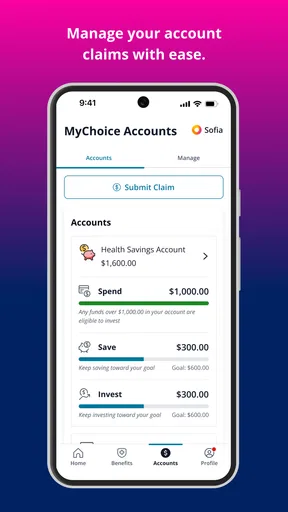
MyChoice Benefits is an app designed to simplify employee benefits management. It allows users to easily access and manage their health, dental, vision, and other workplace benefits. The app offers a user-friendly interface to review coverage details, submit claims, and track expenses, making benefits management straightforward and efficient.
Is MyChoice Benefits available for both Android and iOS devices?
Yes, MyChoice Benefits is available for download on both Android and iOS platforms. Users can find the app on the Google Play Store for Android devices and the Apple App Store for iOS devices, ensuring accessibility regardless of the smartphone or tablet being used.
How secure is my personal information on MyChoice Benefits?
Security is a top priority for MyChoice Benefits. The app uses advanced encryption protocols to protect personal and sensitive data. Regular security audits and updates are conducted to ensure that user information remains secure against potential threats and breaches. Users can be confident that their data is being handled responsibly.
Can I customize notifications and alerts on MyChoice Benefits?
Yes, users can customize notifications and alerts according to their preferences. MyChoice Benefits allows you to set reminders for important dates like premium payments or policy renewals. You can also choose to receive notifications for claims updates, ensuring you stay informed about your benefits status at all times.
Does MyChoice Benefits offer customer support if I encounter issues?
Absolutely. MyChoice Benefits provides robust customer support options to assist users with any issues or queries. Users can access support through in-app chat, email, or phone. The support team is responsive and knowledgeable, ready to help troubleshoot problems or guide you through using the app effectively.


